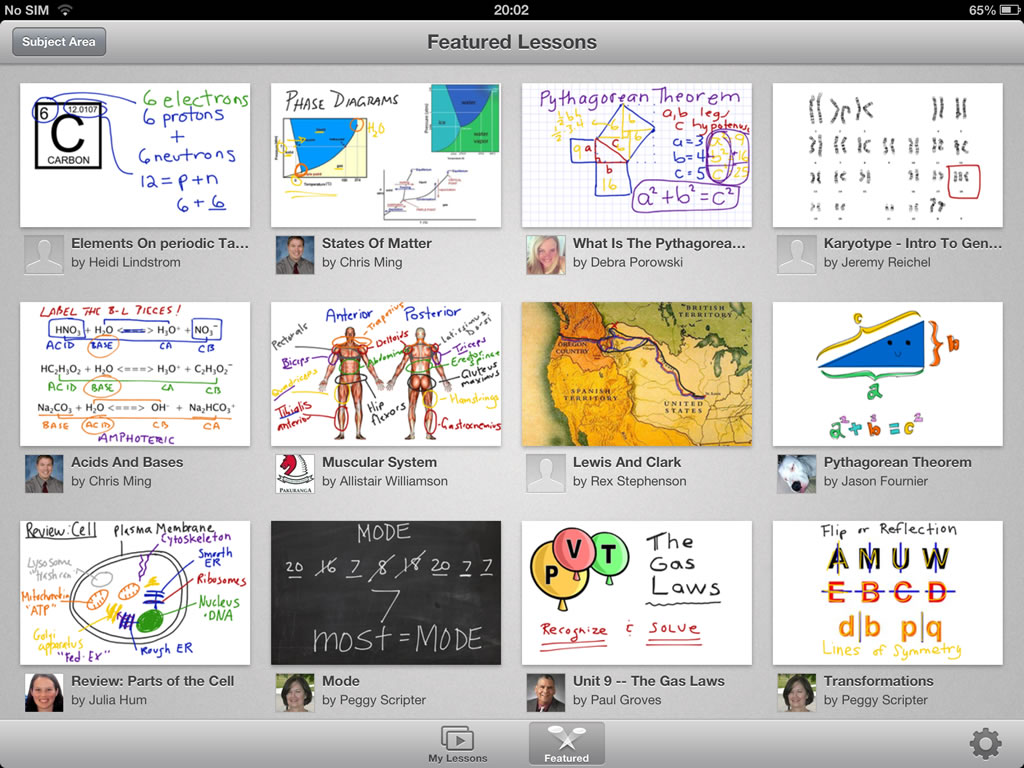
Educreations is a web application, which also has the added option of an app available for mobile devices. Educreations has a free basic plan available. There are also paid plans that provide more features. This app is great for making videos. You can do voice recordings along with using the touch screen on your ipad to create instructional videos that fit your needs! You can import your own documents or images and add your own personal touches. You also have access to what is called a whiteboard. It is sort of like a fancy version of paint where you can draw things out to add into the videos. This could be used for any subject area or grade level. However, I can see where it would be a great tool for math classes so that students can see example problems worked out along with voice over explanations. Once you have created a video, you can share it instantly via social networking sites or download and save it to places like Dropbox or Google Drive. Since these videos are saved in the cloud, they can be accessed at anytime from anywhere!
HOW DOES IT WORK?
First you would need to create an account and choose the plan you would like register for. Once you do that, you are ready to start making videos! There are many options to insert text, pictures, and other documents. You can also use the tools to draw on a blank background or on the documents you have inserted. After you have planned everything out and created your pages, you hit the record button to work through your pages and add instructional voice overs. When your video is complete, you are ready to share it!
Features:
https://www.educreations.com/features/
Examples:
https://www.educreations.com/examples/
Pricing:
https://www.educreations.com/pricing/
Demo:
https://www.educreations.com/lesson/view/how-to-use-educreations/7416256/

I love that you said this tool would be great for math classrooms! I feel like math is a difficult subject for tech integration. I'm always trying to think of ways to use tech more, but it always comes down to a need to actually WRITE something. The whiteboard tool sounds like it solves a lot of that, though!
ReplyDelete